(Compatible article number 25146/25399)
How can I set up my Bayo+ Multidevice Ergonomic Wireless Mouse?
Before using the Bayo+ for the first time, charge the built-in battery of the mouse.
The Bayo+ can be connected wirelessly using the included USB-A receiver or Bluetooth. The mouse provides two Bluetooth channels, allowing you to select Bluetooth channel 1 or Bluetooth channel 2.
You can also use the DPI button to select one of the four available pointer-speed settings.
Charge the mouse before using it for the first time, and select the wireless connection method required for the connected device.-------------------------------------------------------------------------------------------------------------------------------------------------
Charge or recharge the mouse
Charge the built-in battery using the charging port on the front of the mouse and the USB-A charging connection shown in the user guide.
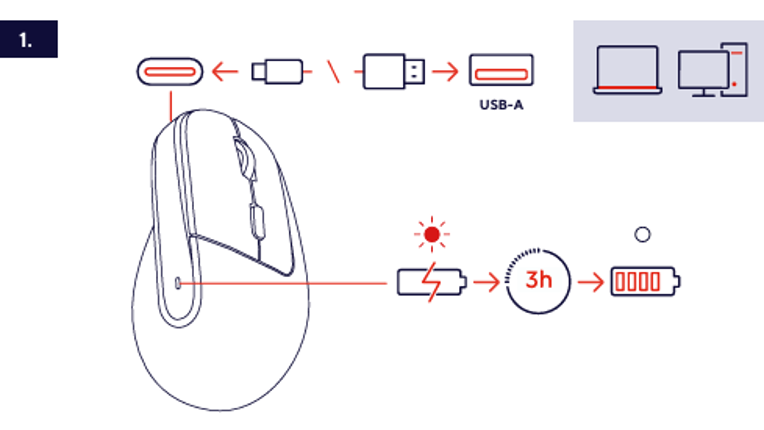
- Locate the charging port on the front of the mouse.
- Connect the charging connector to the charging port of the mouse.
- Connect the USB-A connector of the charging cable to a compatible computer or another suitable USB-A power source.
- Leave the mouse connected while it is charging.
- A complete charge takes approximately 3 hours.
ℹ️ A complete charge of the built-in battery takes approximately 3 hours.Use the USB-A charging connection shown in the user guide.-------------------------------------------------------------------------------------------------------------------------------------------------
Connect using the USB-A receiver
The USB-A receiver is stored in the receiver compartment on the underside of the mouse.
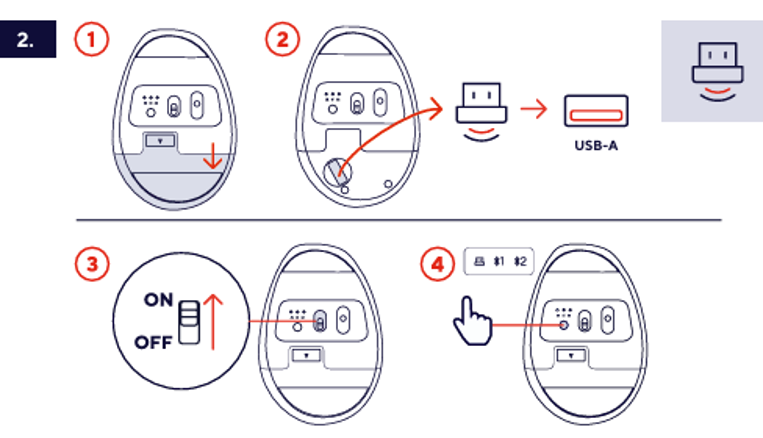
- Open the receiver compartment on the underside of the mouse.
- Remove the USB-A receiver from the receiver compartment.
- Connect the USB-A receiver to an available USB-A port on the compatible computer or other device.
- Move the power switch on the underside of the mouse from the OFF position to the ON position.
- Press the connection selection button until the USB-A receiver connection is selected.
ℹ️ The USB-A receiver can be stored in the receiver compartment on the underside of the mouse when it is not being used.Make sure the mouse is switched on after connecting the USB-A receiver.-------------------------------------------------------------------------------------------------------------------------------------------------
Connect using Bluetooth
The Bayo+ provides two Bluetooth channels. The mouse appears as Trust BT1 or Trust BT2 in the Bluetooth settings of the compatible device, depending on the selected channel.
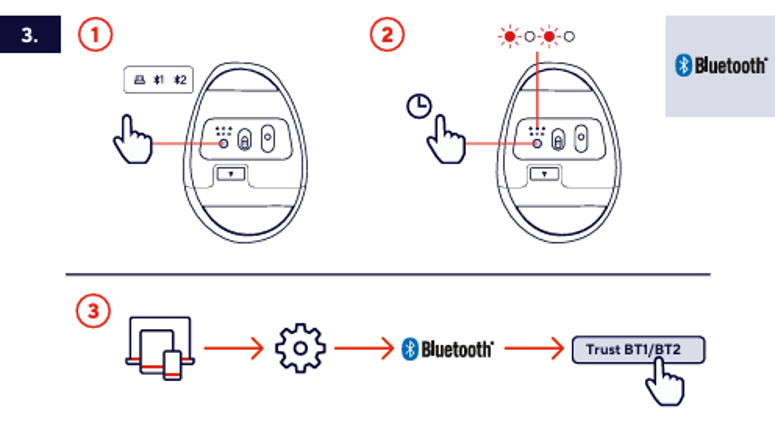
- Switch on the mouse.
- Press the connection selection button to select Bluetooth channel 1 or Bluetooth channel 2.
- Press and hold the connection selection button until the indicator for the selected Bluetooth channel starts flashing.
- Open the Bluetooth settings on the compatible computer, tablet, smartphone, or other device.
- Make sure Bluetooth is enabled on the device.
- Select Trust BT1 or Trust BT2, according to the selected Bluetooth channel.
- Wait until the Bluetooth connection has been established.
ℹ️ The selected Bluetooth-channel indicator flashes while the mouse is ready to establish a Bluetooth connection.Select the same Bluetooth channel on the mouse that appears in the Bluetooth settings of the connected device.-------------------------------------------------------------------------------------------------------------------------------------------------
Adjust the pointer speed
Use the DPI button on the mouse to select the required pointer speed.
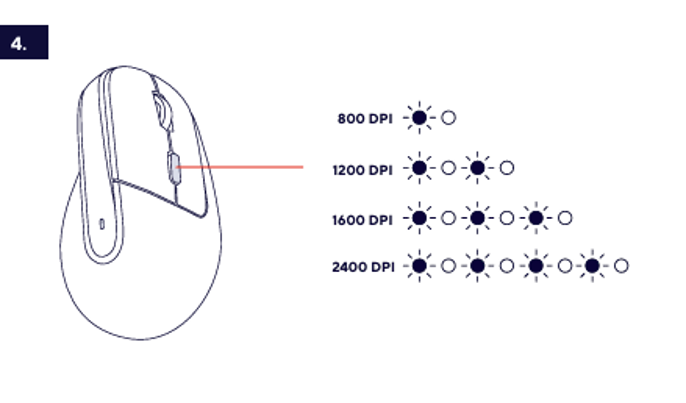
Select a DPI setting
Press the DPI button to switch between the available pointer-speed settings:
- 800 DPI
- 1200 DPI
- 1600 DPI
- 2400 DPI
The DPI indicator shows the selected pointer-speed setting using the indicator pattern shown in the user guide.
ℹ️ A lower DPI setting provides a slower pointer speed. A higher DPI setting provides a faster pointer speed.-------------------------------------------------------------------------------------------------------------------------------------------------
Battery-level indication
The battery indicator on the mouse shows the remaining battery level using the indicator pattern shown in the user guide.
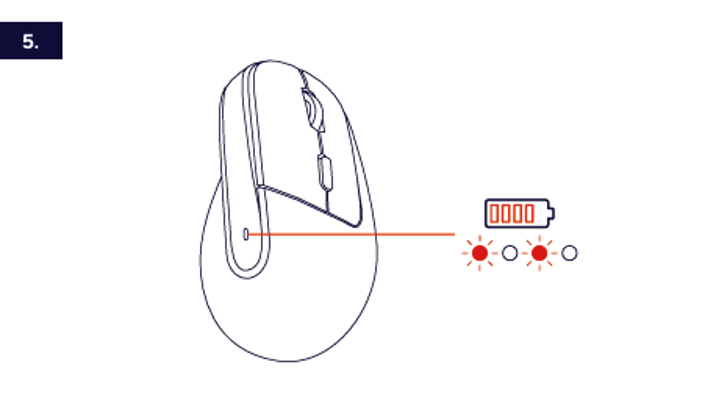
- Check the battery indicator to view the remaining battery level.
- The illuminated indicator pattern represents the current battery level.
- Connect the charging cable when the battery level is low.
Recharge the mouse when the battery indicator shows a low remaining battery level.-------------------------------------------------------------------------------------------------------------------------------------------------
Troubleshooting
The mouse does not switch on
- Move the power switch from the OFF position to the ON position.
- Charge the mouse using the charging connection shown in the user guide.
- Leave the mouse connected for approximately 3 hours for a complete charge.
The USB-A receiver connection does not work
- Check that the USB-A receiver is fully inserted into the USB-A port.
- Check that the mouse is switched on.
- Press the connection selection button until the USB-A receiver connection is selected.
- Connect the USB-A receiver to another compatible USB-A port.
Trust BT1 or Trust BT2 does not appear in the Bluetooth device list
- Make sure the mouse is switched on.
- Make sure Bluetooth is enabled on the compatible device.
- Select Bluetooth channel 1 or Bluetooth channel 2 again.
- Press and hold the connection selection button until the selected Bluetooth-channel indicator flashes.
- Search again for Trust BT1 or Trust BT2.
The pointer speed is too low or too high
- Press the DPI button to select another pointer-speed setting.
- Select 800 or 1200 DPI for a lower pointer speed.
- Select 1600 or 2400 DPI for a higher pointer speed.
The mouse stops responding
- Check the battery-level indicator.
- Recharge the mouse if the remaining battery level is low.
- Check that the required USB-A receiver or Bluetooth connection is selected.
-------------------------------------------------------------------------------------------------------------------------------------------------
Notes:
ℹ️ The Bayo+ supports a USB-A receiver connection and two Bluetooth channels.Charge the mouse before using it for the first time.
Store the USB-A receiver in the receiver compartment when it is not being used.
Was this article helpful?
That’s Great!
Thank you for your feedback
Sorry! We couldn't be helpful
Thank you for your feedback
Feedback sent
We appreciate your effort and will try to fix the article