(Compatible article number 25510)
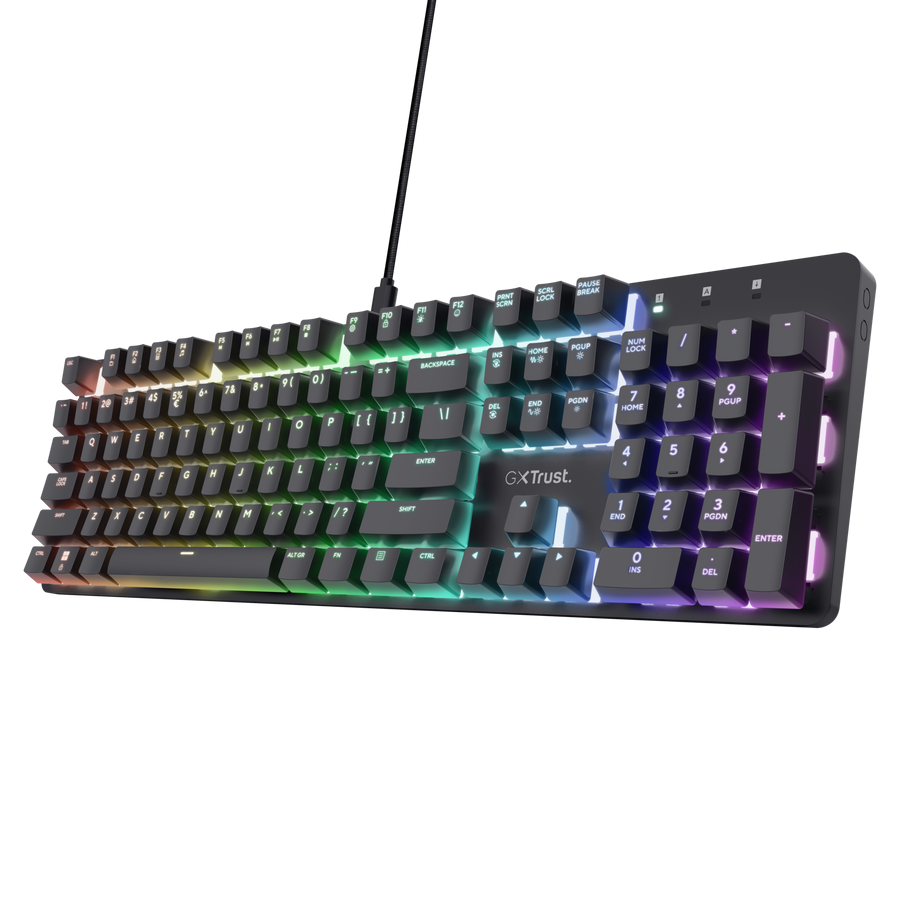
How do I set up the GXT 871 Zora Mechanical Gaming Keyboard?
Connect the supplied USB-C cable to the keyboard, then connect the USB-A plug to an available USB port on your computer.
The keyboard is ready to use as soon as it is detected by Windows.
The GXT 871 Zora is compatible with Windows 10 and Windows 11 and requires an available USB port.
Keyboard overview
The GXT 871 Zora is a full-size mechanical gaming keyboard with 104 keys and a numeric keypad.
- Linear Huano mechanical switches.
- Up to 50 million key presses.
- Full RGB backlighting with up to 16.8 million colour combinations.
- N-key rollover and anti-ghosting.
- Programmable keys through the dedicated software.
- Detachable 1.8 m USB-A to USB-C cable.
- Aluminium top plate.
- Non-slip feet with three height settings.
Function keys
Hold the Fn key and press the relevant function key to use the secondary shortcut shown on the keycap.
The multifunction shortcuts provide quick access to media and system controls, including playback and pause functions.
The exact shortcut assigned to each key is indicated by the icon printed on its keycap.
Lighting controls
The keyboard includes adjustable RGB lighting. Use the Fn lighting shortcuts shown in the user guide and on the keycaps to:
- change the lighting effect - Image 2
- change the colour - Image 2
- increase or decrease the animation speed - Image 3
- increase or decrease brightness - Image 4
More detailed lighting customisation is available through the dedicated software.
---------------------------------------------------------------------------------------------------------------------------------------------
Software installation
Download the GXT 871 Zora software from the Downloads section of the Trust support page for this product.
- Download the software installation file.
- Open the downloaded file.
- Follow the on-screen installation instructions.
- Connect the keyboard directly to the computer and open the software.
ℹ️ The software is supported only on Windows. -------------------------------------------------------------------------------------------------------------------------------------------------
Profiles and macros
The dedicated software can be used to program keys and customise the keyboard lighting.
Select a key in the software and assign the required action. Save the configuration before closing the software.
Always check what are the possible combinations on the provided software-------------------------------------------------------------------------------------------------------------------------------------------------
Gaming mode and key lock
The keyboard supports N-key rollover and anti-ghosting, allowing multiple simultaneous key presses to be registered during gameplay.
Use the Fn shortcut marked with the relevant lock or gaming icon to enable or disable the corresponding key-lock function.
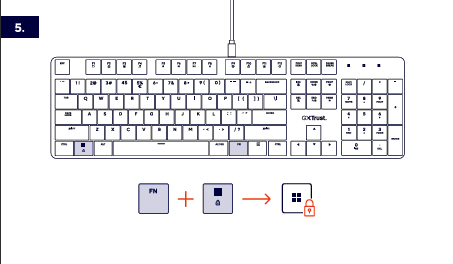
FN+Windows key combination.Troubleshooting
The keyboard is not detected
- Disconnect and reconnect the USB cable.
- Try another USB port on the computer.
- Check that both ends of the detachable cable are fully inserted.
- Restart the computer.
The lighting does not work as expected
- Increase the brightness using the relevant Fn shortcut.
- Select another lighting effect.
- Open the software and check the active lighting configuration.
The software does not detect the keyboard
- Connect the keyboard directly to the computer instead of through a USB hub.
- Close and reopen the software.
- Reinstall the latest available version of the software.
-------------------------------------------------------------------------------------------------------------------------------------------------
Important notes
ℹ️ The GXT 871 Zora is not spill-proof. Keep liquids away from the keyboard.Use the supplied detachable USB-A to USB-C cable or a compatible data cable. A charging-only USB cable may not transmit keyboard input.The keyboard does not include a wrist rest.ℹ️ Adjust the non-slip feet to one of the three available height positions for a comfortable typing angle.Was this article helpful?
That’s Great!
Thank you for your feedback
Sorry! We couldn't be helpful
Thank you for your feedback
Feedback sent
We appreciate your effort and will try to fix the article